Getting Started
Introduction
Welcome to the official documentation for the FindMyClient API.
The API is built for asynchronous search processing. Each search request is queued as a background job and returns a unique job_id. You can retrieve results by polling the result endpoint until the job status is marked as completed.
Both GET and POST methods are supported for flexible integration with applications, scripts, AI agents, and automation workflows.
Async Processing
Search requests are processed in the background to support scalable business discovery and large web data operations.
Workflow Overview
The API follows a simple asynchronous workflow.
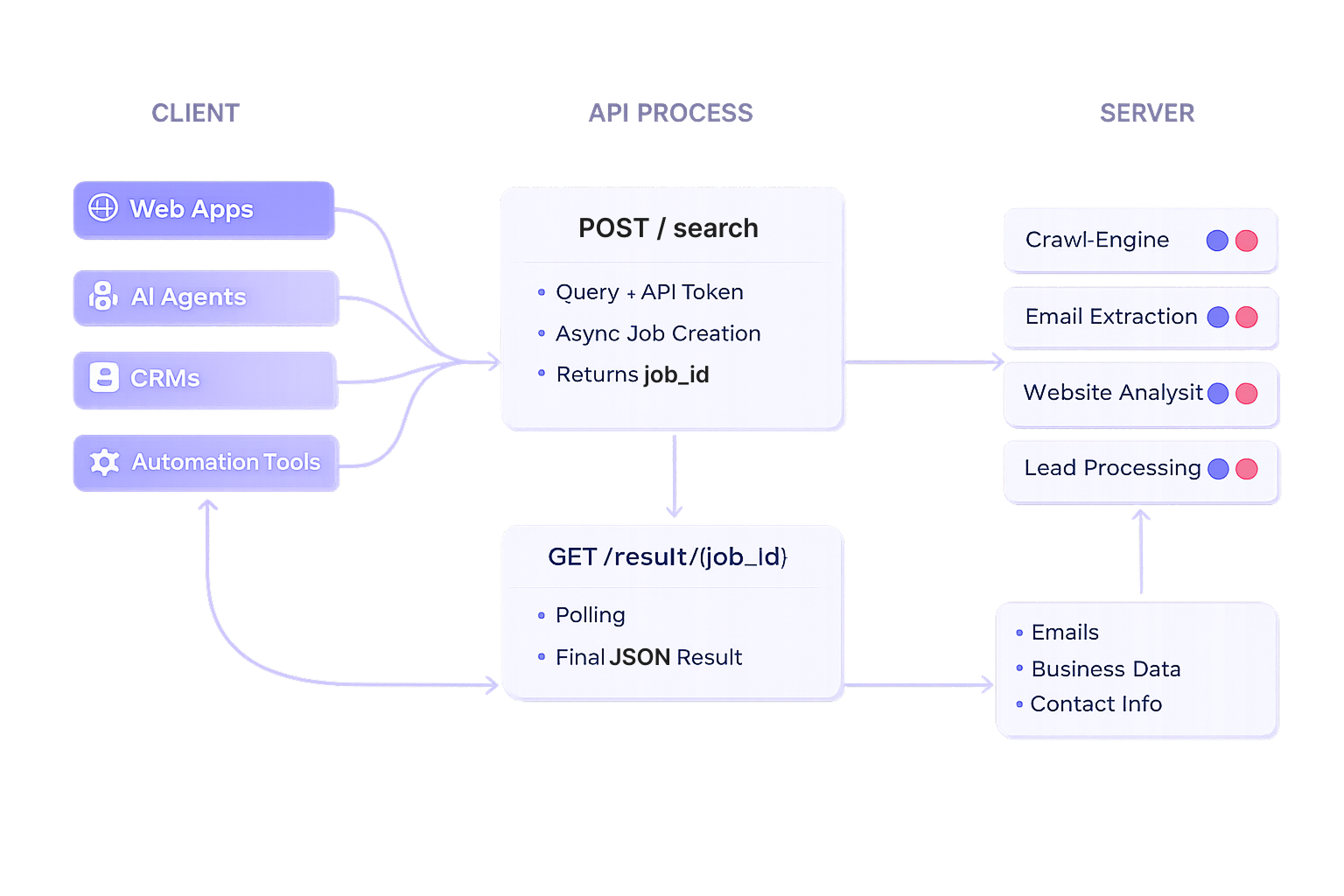
Submit Request
Call the /search endpoint to create a new background search job.
Receive Job ID
The API immediately returns a unique job_id.
Check Status
Poll the result endpoint periodically to monitor progress.
Example:
Completion
Once the status becomes completed, retrieve the final search results.
Designed For
FindMyClient is designed for:
| Use Case | Primary Users | Purpose | Example |
|---|---|---|---|
| AI Agents | AI Developers, SaaS Builders | Allow AI agents to autonomously discover and qualify prospects. | An AI sales assistant finds local businesses matching a target profile. |
| CRM Enrichment | Sales Teams, CRM Administrators | Enhance existing CRM records with additional business and contact information. | Enrich company records before launching an outreach campaign. |
| Internal Lead Generation Systems | Organizations, Growth Teams | Power proprietary lead generation platforms with fresh prospect data. | A company builds its own lead dashboard using FindMyClient APIs. |
| Workflow Automation | Operations Teams, Agencies | Automate lead discovery and data processing tasks. | Automatically send newly discovered leads to a CRM or database. |
| n8n Pipelines | Automation Builders | Integrate lead generation into no-code and low-code workflows. | Trigger lead searches and route results to Google Sheets or Slack. |
| Business Intelligence Tools | Analysts, Researchers | Use business data for reporting, market analysis, and decision-making. | Analyze business density and market opportunities in a region. |
| Developer Integrations | Software Developers | Embed lead generation and enrichment capabilities into applications. | Build a custom prospecting platform using the FindMyClient API. |